
This section is a go-to collection of practical instructional tools. Whether you’re planning a lesson, facilitating a PLC, supporting a colleague, or leading professional development, these resources are built to be immediately useful, adaptable, and aligned to best practices in K–12 education.
Management
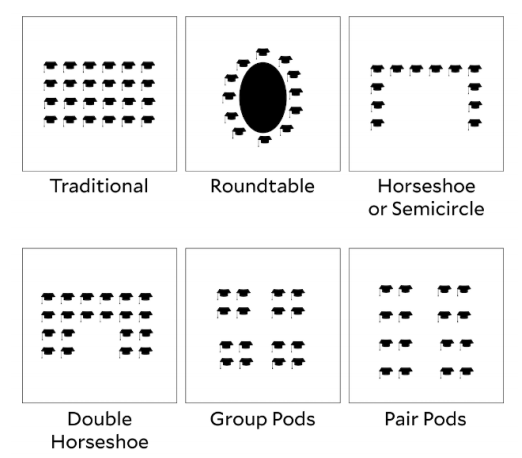
Arrange the Room: An effective room arrangement is a foundational strategy that supports both organization and instruction. Thoughtfully arranged classrooms facilitate efficient traffic patterns, reducing congestion and minimizing off-task behavior as students transition between activities. Strategic setups also encourage frequent interaction, whether through partner work, small groups, or whole-class discussion, by making it easy for students to see and engage with one another. Matching the arrangement to the instructional format is key; for example, rows may support testing or direct instruction, while clusters foster collaboration and inquiry. When the physical space aligns with the learning goals, classrooms run more smoothly and students stay more engaged.
Hand Signals: To help your classroom run smoothly and keep everyone focused. These will allow students to communicate needs without interrupting the lesson or classmates. It’s like having our own silent language that keeps learning on track.
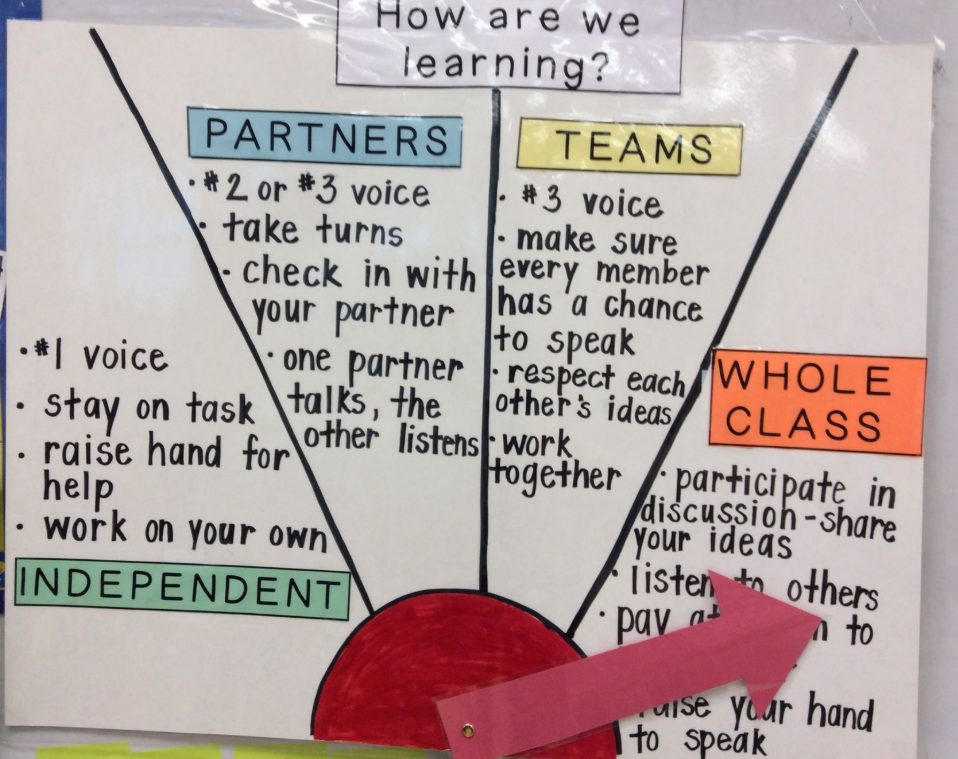
Worktime Expectations: During different work times, students are expected to stay focused, make responsible choices, and use their time wisely. Clear worktime expectations help create a calm, productive environment where everyone can do their best.
Bouncy Balls: Bouncy Balls is a free, interactive noise meter that uses your device’s microphone to detect sound levels in the classroom. As noise increases, colorful balls bounce more vigorously on the screen, providing a visual cue for students to regulate their volume. With various themes like emojis and bubbles, it’s an effective tool for promoting self-regulation among students. Best for: Visual cues, routines, transitions.
Wheel of Names: Add fun and fairness to cold-calling or activity selection with this customizable randomizer. You can spin the wheel to choose students, questions, or tasks.
Best for: Engagement, participation, equity in calling on students.
Classroom Screen: This all-in-one screen includes a timer, noise level monitor, random name picker, traffic light, and more. It’s ideal for transitions, managing time, and maintaining classroom flow.
Best for: Visual cues, routines, transitions.
Engagement
QR Codes: QR codes are a simple but powerful tool to increase student engagement and streamline access to resources. Whether you’re launching an interactive activity, linking to a video, collecting quick feedback, or sharing extension tasks, QR codes provide instant access and save valuable instructional time. Use them to differentiate learning, create scavenger hunts, or offer voice-recorded instructions—QR codes make learning more interactive, accessible, and fun!
Google Forms (with Google Sheets): Perfect for exit tickets, behavior logs, or student check-ins. You can easily gather and analyze responses to inform your next instructional moves.
Best for: Data collection, formative assessment, behavior reflection.
JeopardyLabs: Lets you create use created content games or create customized Jeopardy-style games without needing PowerPoint. It’s perfect for content review, test prep, or injecting fun into formative assessments. Students love the competitive, team-based format.
Best for: Review games, test prep, engaging whole-class learning.
99 Math: is a fast-paced, multiplayer math game that makes practice exciting. Teachers can launch games instantly, track performance in real-time, and engage the entire class in math fluency practice.
Best for: Math fact fluency, engagement, gamified practice for Grades 1–8.
Padlet is a digital bulletin board where students can collaborate by posting text, images, links, or videos. Use it for brainstorming, reflections, exit tickets, or interactive discussions—great for participation from every voice.
Best for: Student collaboration, reflection, visual engagement across content areas.
 Compass Teaching & Learning