
Coaching with AI: Tools to Empower Educators
Education is evolving and AI is here to help. Artificial Intelligence tools can streamline workflow, enhance collaboration, and supercharge professional growth for teachers. Whether you’re a teacher, coach, mentor, or school leader, leveraging AI can free up time for what matters most: people-centered coaching and impactful instruction.
Explore the top AI tools designed to support instructional coaches and educators in real time.
- Streamlining documentation
- Personalizing learning experiences
- Supporting lesson planning
- Enhancing feedback cycles
- Automating repetitive tasks
Tips for Coaching with AI
- Start small: Pick one tool and integrate it into a familiar part of your routine like note-taking or lesson planning.
- Protect privacy: Ensure tools comply with your district’s data, privacy, and FERPA policies.
- Stay human-centered: AI supports the work, it doesn’t replace the relationship-driven heart of coaching.
- Share: Teach teachers how to use AI to save time and deepen impact in their own practice.
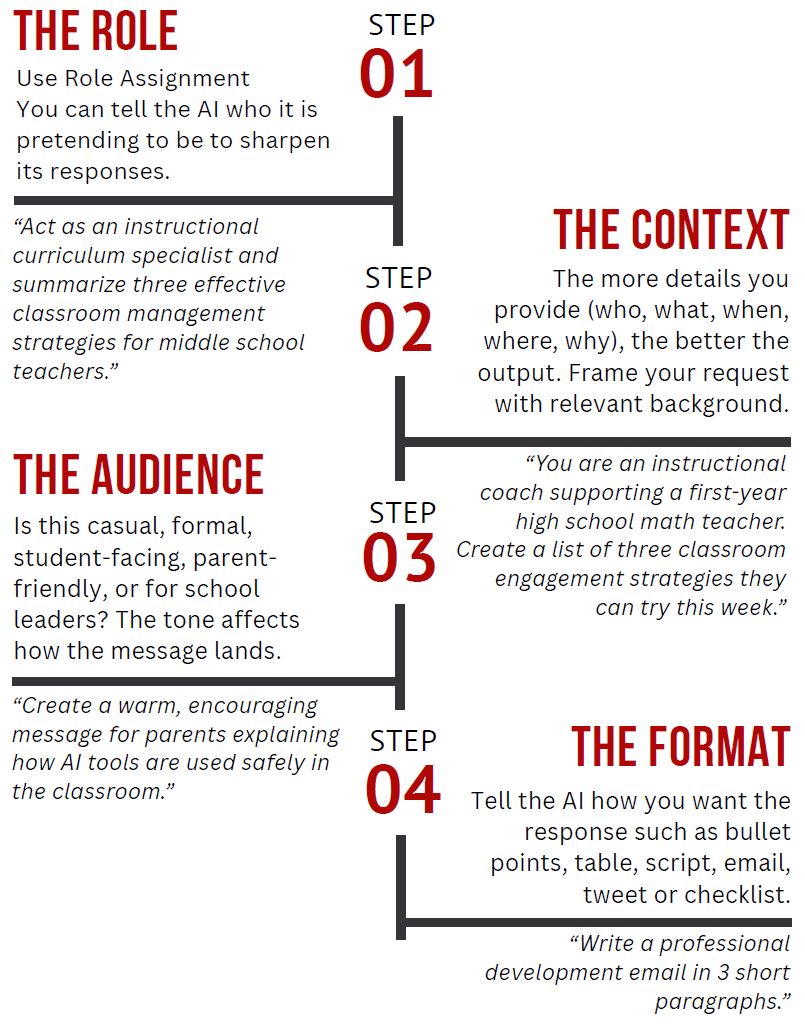
- The Better the Prompt, the Better the Output: AI tools are only as effective as the prompts you feed them. To craft, powerful prompts that drive high-quality responses, download now.
Tools for Exploration
ChatGPT
A conversational AI assistant that can help you brainstorm ideas, generate coaching notes, brainstorm lesson planning ideas, draft feedback, and much more.
- Use it for: Quick content creation, role-playing difficult conversations, scripting emails, and building PD materials.
NoteGPT
An AI assistant that helps with video transcription and summaries, real-time note-taking during classroom walkthroughs or coaching conversations. It can transcribe, summarize, and even analyze classroom interactions for you to review.
- Use it for: Capturing observation data, script and timings from captured video, summarizing coaching meetings, and organizing feedback trends.
- Create a YouTube Channel to store your videos to use with NoteGPT
Google Gemini
Google’s AI assistant designed to work with Google Workspace. It integrates with Docs, Sheets, and Gmail to generate text, automate tasks, and enhance productivity.
- Use it for: Creating data dashboards, auto-generating coaching reports, and drafting professional emails.
Microsoft Copilot
Embedded within Microsoft 365, Copilot uses AI to assist with tasks in Word, Excel, Teams, and PowerPoint. It’s like having a coaching intern inside your apps.
- Use it for: Creating data visualizations, analyzing student achievement trends, building presentations, and documenting meetings.
 Compass Teaching & Learning